
If you’ve been running torrents for a while, you already know that no single seedbox provider is the right fit for everyone. Maybe you’re paying more than your usage justifies, maybe support has gone quiet when you needed it, or maybe you’ve outgrown your current app selection, storage tier, or server location. Whatever the reason, if you’re comparing your current provider against the market, the smart move isn’t to chase whoever shouts loudest, it’s to decide on your own criteria first. Seedbox.io is one of the established names people compare against, and this guide is written to help you evaluate any alternative fairly — using the checklist we apply in every review on this site — then see how our disclosed picks measure up.
Why people look for a seedbox alternative
The reasons tend to cluster into a handful of themes, and being honest about which one applies to you makes the search much shorter:
- Price and value. You want more storage, bandwidth, or apps for the money you already spend, or you want a cheaper entry point to get started.
- Support responsiveness. When rtorrent stalls or an app breaks, you want a fix, not a queue.
- Features and apps. Plex, Sonarr, Radarr, a good web torrent client, VPN options — the exact mix matters, and it changes over time.
- Speed and reliability. Consistent throughput and uptime beat a big headline port speed you never actually see.
- Server location. Latency, jurisdiction, and proximity to your trackers or your home connection all play a role.
None of these make your current provider bad. They just mean your needs and their offering have drifted apart. If you’re still deciding whether a seedbox is even the right tool for you, the guide on whether you should use a seedbox is a good place to start before you compare hosts.
What to look for in any seedbox alternative
Before you look at a single provider’s marketing page, write down what actually matters to you. Here’s a checklist that works no matter which host you end up evaluating:
- Storage that matches your library. Be realistic about how much you seed and keep. Paying for 8TB you’ll never fill is as wasteful as constantly bumping a ceiling that’s too low.
- A download policy you understand. Check whether downloads are metered or unlimited, and whether “unlimited” comes with fair-use caveats.
- The apps you’ll actually use. One-click installs for Plex, the *arr stack, and your preferred torrent client save hours. Count the ones you need, not the total on the list.
- Managed vs. unmanaged. A managed box means the host handles the OS, updates, and breakages. Unmanaged is cheaper but you’re the sysadmin.
- What happens when something breaks. Ask how issues are detected and fixed. Automated self-healing and responsive human support both matter.
- Locations and network. Pick a region that suits your latency and legal comfort, and look for evidence of real, sustained speeds rather than just a port number.
- Privacy tooling. Bundled VPN (WireGuard/OpenVPN) is a genuine convenience if you want traffic wrapped without extra setup.
- Clear pricing and an easy exit. Transparent tiers, no surprise renewals, and a straightforward way to leave if it doesn’t work out.
If you’re newer to any of this, this beginner’s guide to seedboxes explains the terminology behind each item above.
How our premium pick, EvoSeedbox, measures up
Here is EvoSeedbox held to the same checklist — real specs as we verify them, not aspirations:
- Storage and tiers. Plans start at $5/mo for 150GB and scale up through dedicated Plex tiers from 2TB to 8TB (roughly $15–$60/mo), so you can right-size instead of overpaying. See the full pricing page for the current lineup.
- Unlimited downloads. No metering on your traffic — seed and grab as much as your plan’s storage allows.
- 50+ one-click apps. Plex, Sonarr, Radarr, web torrent clients, and dozens more install without touching a terminal.
- Managed hosting with App Doctor. Its fleet of 46 servers runs App Doctor, a self-healing system that detects and repairs common app failures automatically, so a stalled client or a wedged container often fixes itself before you notice.
- Privacy included. WireGuard and OpenVPN come bundled — no separate subscription to route your traffic.
- Location choice. Servers in the Netherlands plus Canada, the UK, and France, so you can pick for latency and jurisdiction.
EvoSeedbox is not the right answer for every use case — if you need a specific niche app it doesn’t carry, another host may serve you better, and if your budget stops nearer $3–5/month our value pick Iseedfast covers the entry tier. For a broader view of the category, see our Best Seedbox 2026 comparison.
An honest note on comparing providers
Seedbox.io is an established provider with a long-standing user base, and plenty of people are happy there. As of 2026, their specific plans, pricing, and features can change, so always check their current offering directly rather than trusting a comparison table someone wrote a year ago. The same goes for every host we review. The point of this article isn’t to talk you out of one provider and into another — it’s to give you a set of criteria you can apply to all of them, so whatever you choose is a decision you can defend. Judge every provider — including our own picks — against your own checklist.
How to test a host properly before you commit
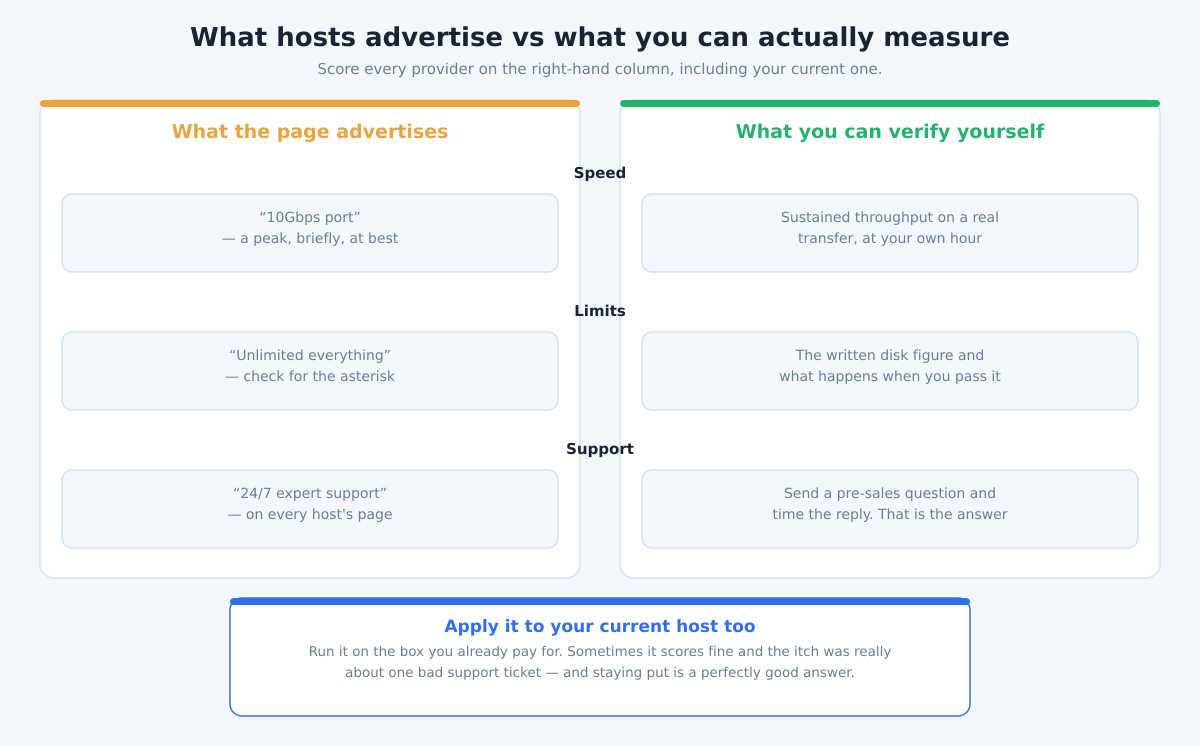
The checklist above tells you what to compare. The problem is that almost every item on it is something the provider asserts about itself, and every provider asserts the same things. So here is how to actually measure a host in an afternoon — including the ones we recommend.
- Measure sustained throughput, not the advertised port. A port speed is a ceiling, not a promise. Pull a large, well-seeded public torrent — a current Linux distribution ISO is the standard test — and watch what the rate settles at after the first minute. The opening burst is meaningless; the plateau is the number you are buying.
- Test at your hour, not theirs. A shared box at 4 a.m. tells you nothing about the same box at 9 p.m. on a Sunday. Run the same test twice, once at each, before you draw a conclusion.
- Send a pre-sales question and time the reply. This is the single most predictive test there is, and it costs nothing. Ask something specific and slightly awkward — what happens when you exceed the disk allowance, say. How long the answer takes, and whether it actually answers, is a fair preview of how a real 2 a.m. ticket will go.
- Read what happens at the limit, not what is unlimited. Every host says unlimited something. The useful question is the behaviour at the edge: is traffic beyond the allowance throttled, billed, or stopped? A host that documents throttling honestly is telling you more than one that documents nothing.
- Check the money-back window before you migrate anything. Test inside it. Moving a terabyte and then discovering the throughput disappoints is an expensive way to learn, and the refund window is usually shorter than a full migration takes.
- Install the one app you actually care about. Not all fifty. If Plex is why you are here, install Plex and play something. App counts on a feature page are cheap; a working transcode is not.
Apply all six to your current provider as well. It is entirely possible the honest outcome is that the box you already have is fine, and the thing that actually annoyed you was one slow ticket — that is a real result, and it saves you a migration.
Frequently Asked Questions
How do I switch seedbox providers without losing my setup?
Start by signing up with the new host and getting your apps configured before you cancel the old one, so you have an overlap window. Rebuild your torrent client, Plex, and *arr configs on the new box, confirm everything works, then decommission the old account. Keep your old box active until you’re sure the migration is complete.
Can I move my downloaded data between seedboxes?
Yes. The usual approach is a server-to-server transfer using rsync, SFTP, or FTP directly between the two boxes, which is far faster than downloading everything to your home connection and re-uploading. If you’re on a managed host, support can often help you set up the transfer.
Will I lose my torrent seeding history when I switch?
Your ratio and seeding stats live on your private trackers, not on the seedbox, so switching hosts doesn’t reset them. What you do need to re-add are the torrents themselves — move the data plus the .torrent files, and re-check the data in your new client to resume seeding.
What’s the single most important thing to check in an alternative?
Match the plan to your real usage — storage, download policy, and the specific apps you rely on. A cheaper price or bigger number is meaningless if the box doesn’t do what you actually need day to day.
Is a managed seedbox worth it over an unmanaged one?
If you don’t want to be your own sysadmin, yes. Managed hosting means updates, OS maintenance, and app failures are handled for you. Features like automated self-healing (App Doctor on EvoSeedbox) mean many issues get fixed without you filing a ticket at all. Unmanaged is cheaper but assumes you’re comfortable maintaining the stack yourself.
Ready to compare on your own terms? Our Best Seedbox 2026 guide puts 10+ providers side by side, or go straight to the picks above: EvoSeedbox from $5/mo (premium) or Iseedfast from $3/mo (value). Whatever you decide, judge it against your checklist, not the hype.
Notes from readers