
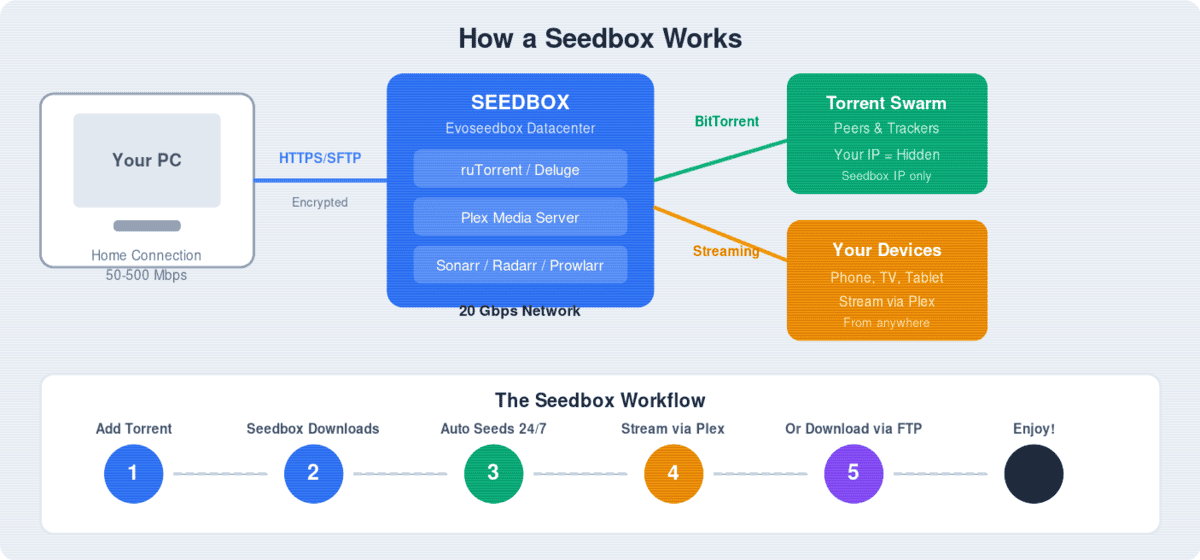
We independently reviewed 15 seedbox providers for 2026, comparing every plan on price, speed, storage, bandwidth policies, Plex support, and customer service quality. Unlike provider-run comparison pages, Cheap Seedboxes is not a seedbox company — we have no financial incentive to rank any provider higher than another.
Last updated: August 2026 | Providers tested: 15 | Plans compared: 60+
Best Seedbox 2026: Key Facts
- Seedbox prices in 2026 range from $3/month (Iseedfast) to $72/month (RapidSeedbox Furious)
- The best value plan is Appbox BG-2000 at €6.12/month for 2 TB on 10 Gbps with unmetered bandwidth
- The cheapest plan with Plex is Evoseedbox Flash at $5/month
- The fastest network available is Whatbox at 100 Gbps (NVMe plans)
- Most providers offer 7–14 day money-back guarantees
- Unlimited bandwidth is offered by Evoseedbox, Iseedfast, RapidSeedbox, and Bestbox
- All seedboxes hide your IP from the torrent swarm — price does not affect privacy
Best Seedboxes 2026 — Full Comparison Table
Disclosure: Evoseedbox and Iseedfast are our own seedbox services. We include them below and rate them on the same criteria as every other provider — see how we work.
| Provider | Best Plan | Price/mo | Storage | Speed | Bandwidth | Plex | Support | Score |
|---|---|---|---|---|---|---|---|---|
| Evoseedbox | Flash | $5 | 150 GB | 20 Gbps | Unlimited | Yes | 24/7 Ticket | 9/10 |
| Iseedfast | Basic | $3 | 50 GB | 1 Gbps | Unlimited | No | 24/7 Ticket | 8.5/10 |
| Appbox (formerly The Seedbox Company) | BG-2000 | €6.12 | 2 TB | 10 Gbps | Unmetered | Yes | Ticket | 8.5/10 |
| Ultra.cc | Lancer-v2 | €4.95 | 1 TB | 50 Gbps | 2 TB upload cap | Yes | Ticket | 8/10 |
| SeedHost.eu | HD 1 | €2.70 | 1 TB | 10 Gbps | 1 TB cap | Select | 8/10 | |
| Swizzin | Alpha | $15.95 | 2 TB | 10 Gbps | 8 TB cap | Yes | Ticket/Discord | 7.5/10 |
| RapidSeedbox | Fast | €18 | 1.2 TB | 1 Gbps | Unlimited | No* | 24/7 Chat | 7.5/10 |
| Whatbox | H3-4 | €14 | 3.9 TB | 40 Gbps | 10 TB cap | Yes | Ticket | 8/10 |
| DediSeedbox | Starter | $10 | 750 GB | 10 Gbps | Unmetered | Yes | Ticket | 7.5/10 |
| Pulsed Media | Budget | $3.49 | Varies | 1-10 Gbps | Varies | Yes | Ticket | 7/10 |
| Seedboxes.cc | Cactus | $14.35 | 1.5 TB | 20 Gbps | Unlimited | Yes | Ticket | 7.5/10 |
| Cloudboxes.io | GPU Small | €19.95 | 2 TiB | 20 Gbps | 4 TB cap | Yes | Ticket | 7.5/10 |
| Giga-Rapid | MINI | $2.68 | 15 GB | 2 Gbps | 3 TB cap | No | Ticket | 6.5/10 |
| Seedit4.me | Hero Pro | $17.56 | 2 TB | 2 Gbps | 9 TB upload | Yes | Ticket | 7/10 |
| Feral Hosting | SSD | $134 | 1.2 TB SSD | 20 Gbps | Unlimited | Yes | Ticket | 7/10 |
- Evoseedbox: Use code
evoboxat checkout - DediSeedbox: Use code
CHEAPSEEDBOXESfor discount - Seedbox.IO: Use code
cheapbox20for 20% off
* RapidSeedbox Plex is only available on plans $18/month and above.
Top 5 Picks: Detailed Reviews
1. Evoseedbox — Best Overall Value (9/10)
Price: $5–$18/month | Speed: 20 Gbps | Bandwidth: Unlimited | Plex: All plans
Evoseedbox delivers the best combination of speed, features, and price in 2026. Every plan includes Plex, unlimited bandwidth, and a 20 Gbps shared network — specs that most competitors charge $15+ for. The one-click installer supports 50+ apps including Sonarr, Radarr, Prowlarr, and Jellyfin. Storage ranges from 150 GB ($5) to 600 GB ($18). The only limitation is storage size at the entry level, but for most users 150 GB handles 30+ active torrents comfortably.
Best for: Plex streaming on a budget, private tracker seeding, users who want everything included at a fair price.
Read our full Evoseedbox review →
2. Iseedfast — Cheapest Seedbox Available (8.5/10)
Price: $3–$15/month | Speed: 1 Gbps | Bandwidth: Unlimited | Plex: $5+ plans
At $3/month, Iseedfast is the cheapest seedbox that is actually usable. Unlimited bandwidth means your seedbox never stops seeding, which is critical for private tracker ratio. The 1 Gbps speed is more than enough for comfortable downloading and seeding — most home connections cannot utilize more than this during FTP transfers anyway. For users who just need basic torrenting and seeding without Plex, this is unbeatable value.
Best for: Budget-conscious users, private tracker seeding, first-time seedbox users.
Read our full Iseedfast review →
3. Appbox (formerly The Seedbox Company) — Best Storage Per Dollar (8.5/10)
Price: €6.12–€30.79/month | Speed: 10–25 Gbps | Bandwidth: Unmetered | Plex: All plans
Appbox BG-2000 at €6.12/month offers 2 TB on a 10 Gbps network with unmetered bandwidth. That is 4x the storage of RapidSeedbox’s cheapest plan at 25% less cost. The NG-3500 (€9.77) scales to 3.5 TB on the faster NG line. For media hoarders who need maximum storage without bandwidth worries, this is the best value in the market.
Best for: Large media libraries, media hoarders, users who prioritize storage over everything else.
4. Ultra.cc — Best for Raw Speed (8/10)
Price: €4.95–€69.95/month | Speed: 50 Gbps | Bandwidth: Upload capped (2–70 TB)
Ultra.cc claims the fastest shared network in the seedbox market at 50 Gbps. Storage ranges from 1 TB to 28 TB across 16 plans, all with Plex included. The catch: every plan caps upload bandwidth. The cheapest Lancer-v2 (€4.95) has only a 2 TB upload cap — once you hit it, seeding stops for the month. This makes Ultra.cc excellent for downloading and streaming but less ideal for competitive private tracker seeding.
Best for: Speed-focused users, media streaming, users who download more than they seed.
Read our full Ultra.cc review →
5. SeedHost.eu — Best Budget 10 Gbps (8/10)
Price: €2.70–€60/month (shared) | Speed: 10–40 Gbps | Bandwidth: Capped (1–70 TB shared)
SeedHost HD 1 at €2.70/month puts 1 TB of storage on a genuine 10 Gbps network — the best storage-per-dollar at this speed tier. NVMe plans (40 Gbps) are available for torrent racing. The main limitation is bandwidth caps: the HD 4 plan has only 5 TB, meaning you can barely seed your full disk once. Best for users who need 10 Gbps speed for racing but manage their seeding carefully.
Best for: Torrent racers, users who need 10 Gbps on a budget, large storage at mid-range pricing.
Read our full SeedHost.eu review →
How to Choose the Right Seedbox
1. Decide your budget
Seedboxes range from $3 to over $70/month. Most users are well-served in the $5–$15 range. See our under $5 and under $10 guides for price-focused comparisons.
2. Check the bandwidth policy
This is the most important factor that provider marketing hides. “Unlimited downloads” often means uploads are capped. If you use private trackers and need to seed continuously, choose a provider with genuinely unlimited bandwidth (Evoseedbox, Iseedfast, RapidSeedbox). See our unlimited bandwidth comparison.
3. Do you need Plex?
If you want to stream your seedbox content to your phone, TV, or tablet, you need Plex support. Not all plans include it — notably, RapidSeedbox locks Plex behind their $18/month tier. Evoseedbox includes Plex on all plans starting at $5. See best seedboxes for Plex.
4. Speed vs. storage trade-off
Higher speed plans typically offer less storage (and vice versa). For torrent racing, prioritize speed (10 Gbps+). For media libraries, prioritize storage (2 TB+). For general use, 1–10 Gbps with 150 GB–1 TB is the sweet spot.
5. Support quality
When something breaks at 2 AM, support matters. RapidSeedbox is the only provider with 24/7 live chat (€18+/month). Evoseedbox and Iseedfast offer 24/7 ticket support. Most others are ticket-only with 12–24 hour response times.
Common Mistakes When Choosing a Seedbox
Mistake 1: Choosing by speed alone
A 50 Gbps seedbox means nothing if it caps your uploads at 2 TB/month. Always check the bandwidth policy before the speed number.
Mistake 2: Ignoring the Plex tax
Some providers advertise low starting prices but require premium plans for Plex. RapidSeedbox now starts at €18/month, and every plan it currently sells includes Plex. Check before you buy.
Mistake 3: Overpaying for support
24/7 live chat is nice, but most seedbox issues are resolved by a simple restart. If you are comfortable with ticket support, you can save 50–70% by choosing a provider like Evoseedbox or The Seedbox Company instead of RapidSeedbox.
Frequently Asked Questions
What is the best seedbox in 2026?
For overall value, Evoseedbox at $5/month — it includes Plex, unlimited bandwidth, and 20 Gbps speed. For maximum storage, Appbox BG-2000 at €6.12/month offers 2 TB on 10 Gbps. For the absolute cheapest, Iseedfast at $3/month.
What is the cheapest seedbox available?
Giga-Rapid MINI at $2.68/month (15 GB), but it is impractically small. The cheapest usable seedbox is Iseedfast at $3/month (50 GB, unlimited bandwidth). See our best seedboxes under $5 comparison.
Is a seedbox better than a VPN for torrenting?
Yes. A seedbox provides better privacy (your IP never enters the swarm), faster speeds (1–50 Gbps vs. your home connection), and 24/7 seeding capability. At $3–$5/month, seedboxes cost the same as VPNs. See our Seedbox vs VPN comparison.
Can I use Plex on a cheap seedbox?
Yes. Evoseedbox includes Plex on all plans starting at $5/month. Ultra.cc and Appbox also include Plex on all tiers. RapidSeedbox requires $18/month for Plex. See best seedboxes for Plex.
Do I need unlimited bandwidth?
If you use private trackers and need to maintain ratio, yes — bandwidth caps stop your seeding mid-month. For casual use or Plex-only streaming, capped plans are fine. See unlimited bandwidth seedboxes.
Is a seedbox better than Real-Debrid?
For private trackers, yes — debrid does not seed back and will get you banned. For public tracker casual use, debrid is simpler. At the same $3/month price, a seedbox offers more. See our Seedbox vs Debrid comparison.
More Comparisons
By Price
By Feature
Comparisons
Provider Reviews
Tools
More Seedbox Comparisons
- Seedbox FTP Speed Compared — what really determines transfer speed, and a five-step test to run on any trial.
- Seedbox for Ratio — why upload allowance decides it, and the arithmetic to do before you pay.
- DMCA and Seedboxes — who actually receives the notice, how provider policies differ, and what “DMCA-ignored” really means.
- Seedbox With RAID — how to check what your provider actually runs, in ten seconds, and why RAID is not a backup.
- AppBox Review 2026 — a serviceable entry-level box, and why its recommendation volume overstates it.
- Hetzner as a Seedbox — why a dedicated server is not automatically cheaper, and what DIY really costs.
- Feral Hosting Review 2026 — good value for archival seeding, and the disk-contention caveat behind its unlimited bandwidth.
- Seedit4.me Review 2026 — root access on a shared box, NVMe-buffered storage, and the fair-use limits worth reading first.
- Cloudboxes.io Review 2026 — GPU transcoding built in, published per-plan benchmarks, and the bandwidth line to read twice.
- SNTHostings Review 2026 — fair pricing and a bundled WireGuard VPN, undercut by three contradictory answers about where your data is hosted.
- LeechDrive Review 2026 — a small, honest budget box that publishes its server density; read the public-tracker upload throttle first.
- Meggafast Review 2026 — cheap UK plans, an 8% PayPal surcharge, and a website currently serving injected spam.
- Best Seedbox for Private Trackers 2026 — ranked by unlimited upload and ratio-building.
- Ultra.cc vs Whatbox 2026 — two premium favourites, head to head.
- Seedboxes.cc Alternatives — the checklist for evaluating a switch, plus a safe migration walkthrough.
- Seedbox.io Alternatives — six real-world tests to run on any host before you commit.
- DediSeedbox Alternatives — shared vs dedicated, and when you actually need your own machine.
Notes from readers